Backflip’s X-to-CAD AI platform now supports meshes, photos, videos, and engineering drawings. It’s gotten surprisingly good.
This is Engineering Paper, and here’s the latest design and simulation software news.
Last week I noted that Backflip, whose mesh-to-CAD AI platform went live over the summer, has added two new modalities: drawing-to-CAD and photo-to-CAD. I’ve now spoken with Backflip CEO Greg Mark about the new features and tried them out myself.
When I tested Backflip’s original mesh-to-CAD AI, I found it impressive but imperfect. That modality offers users the choice of fast mode, which works quickly and costs less, or thinking mode, which takes longer and costs more, but supposedly provides better results. Fast mode provides four CAD options, while thinking mode provides only one. The new modalities, for now, only work in thinking mode.
I started with photo-to-CAD, using three pictures I hastily took on my phone of a simple bottle opener:
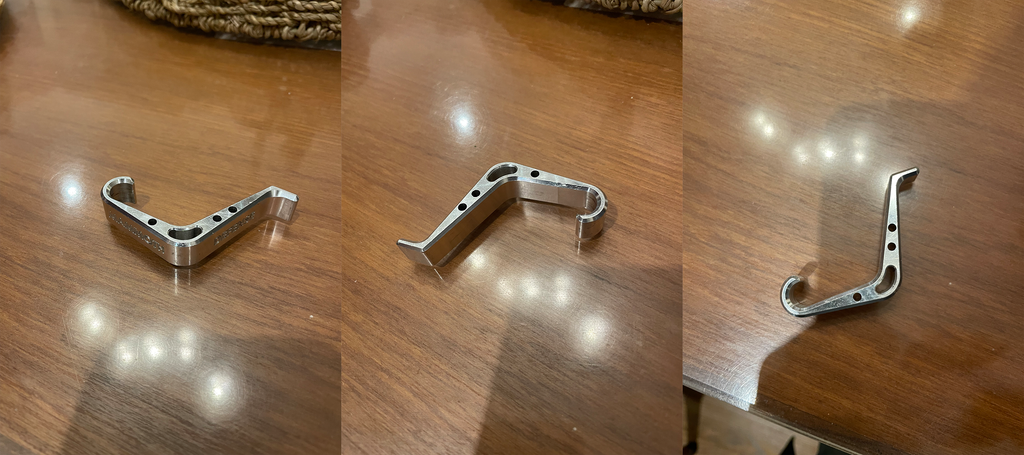
I uploaded the pictures into Backflip, skipping the option to add known dimensions. After nearly 10 minutes, Backflip returned this CAD model:
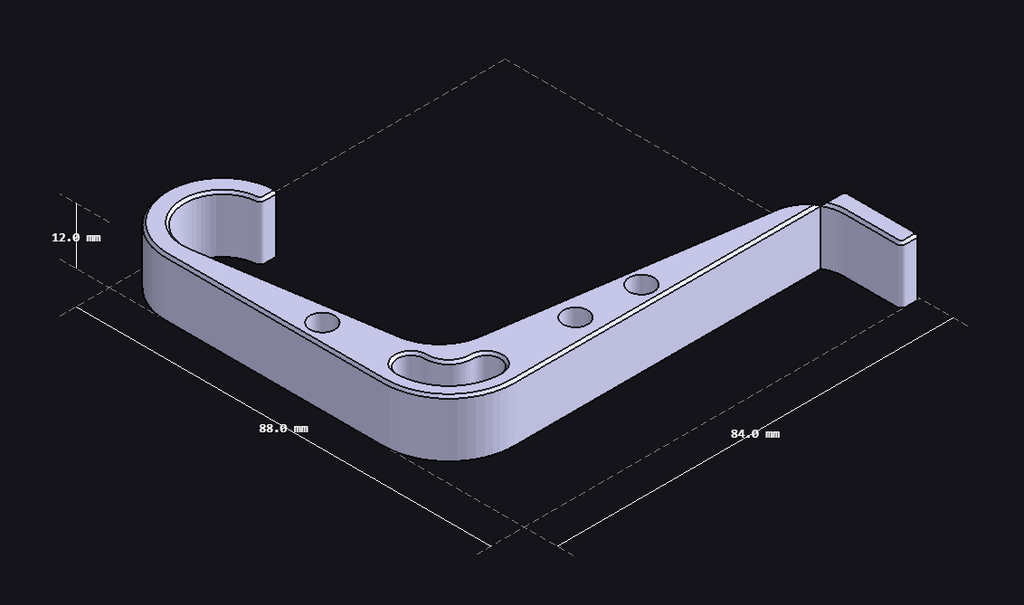
From three shoddy phone pictures, this is a creditable result. But it’s not accurate. The tail end of the bottle opener is nonsensically cleaved from the rest of the part, and close inspection reveals the shape of the cutouts and hook are incorrect. The dimensions are also off; the business end of the opener should snugly fit a bottle cap, so it’s clear the CAD model is oversized.
Though there was nothing to indicate scale in my pictures, Backflip might still have been able to infer the dimensions. For example, Mark explained, “our model has seen iPhone chargers, so… somewhere in its weights are the dimensions of an iPhone charger.”
I was surprised to discover another new modality that wasn’t mentioned in Backflip’s announcement: video-to-CAD. I decided to try that next. Inspired by Mark’s example, I took this video of an iPhone charger:

In about 15 minutes, Backflip gave me this CAD model:
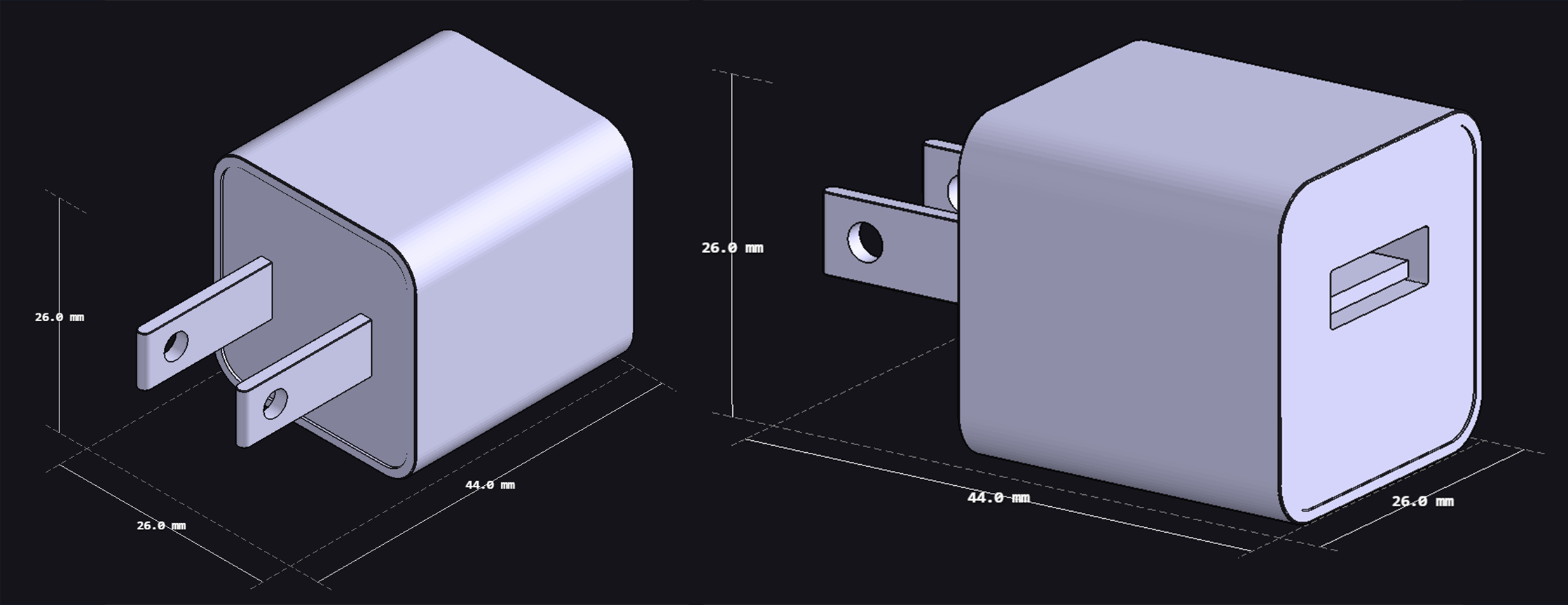
Those dimensions, just as Mark said they’d be, are spot on. I can only nitpick about the details. The prongs don’t have quite the right shape, and there’s a slight inset on the front and back faces that shouldn’t be there, but altogether this model is better than I expected.
I was even more impressed with Backflip’s drawing-to-CAD capability. To test it I turned to TooTallToby.com, which hosts speed modeling tournaments where (human) users convert drawings into CAD. I chose one of the site’s practice models to put into Backflip. This is the drawing:
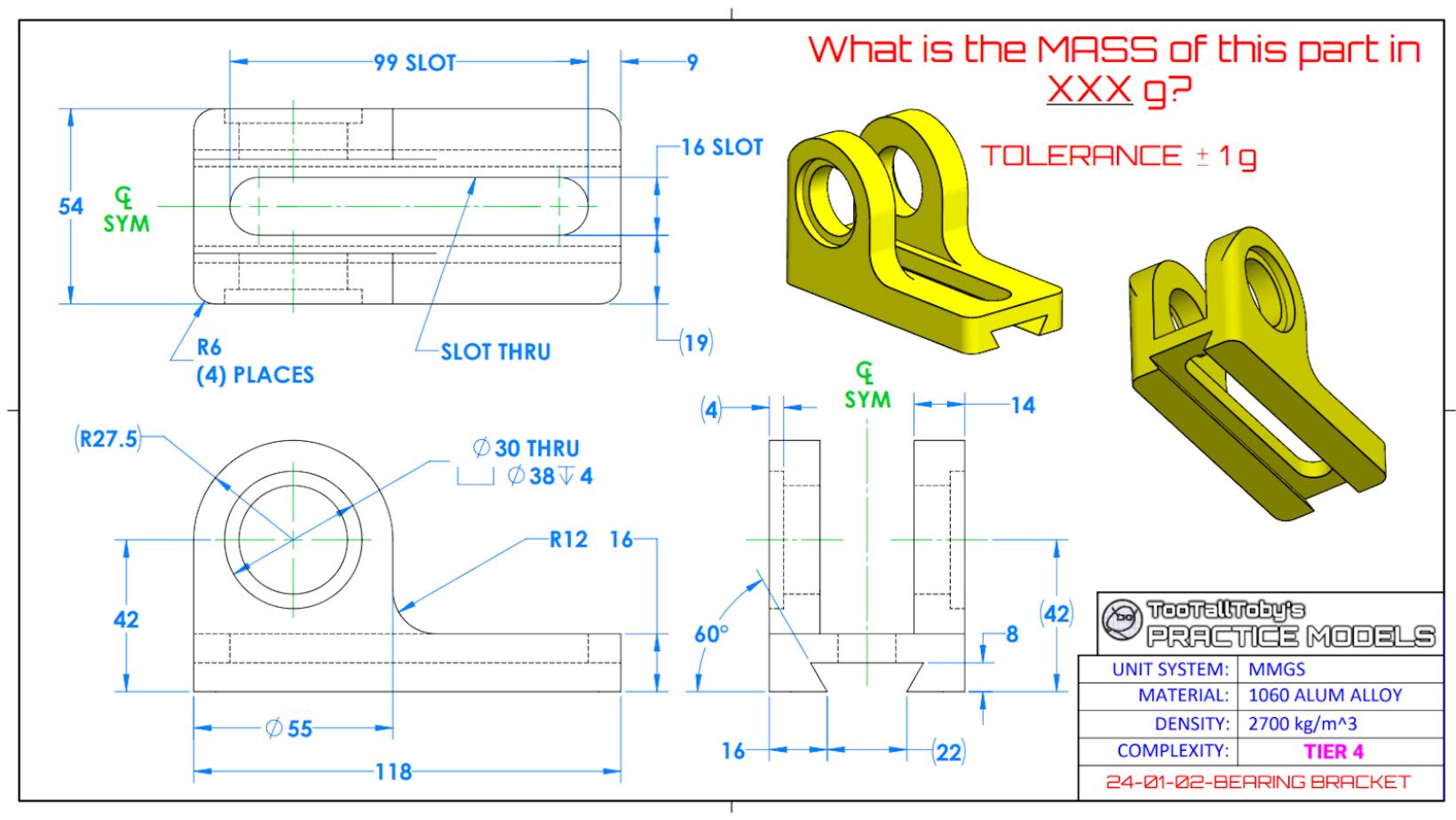
And here’s Backflip’s CAD conversion:
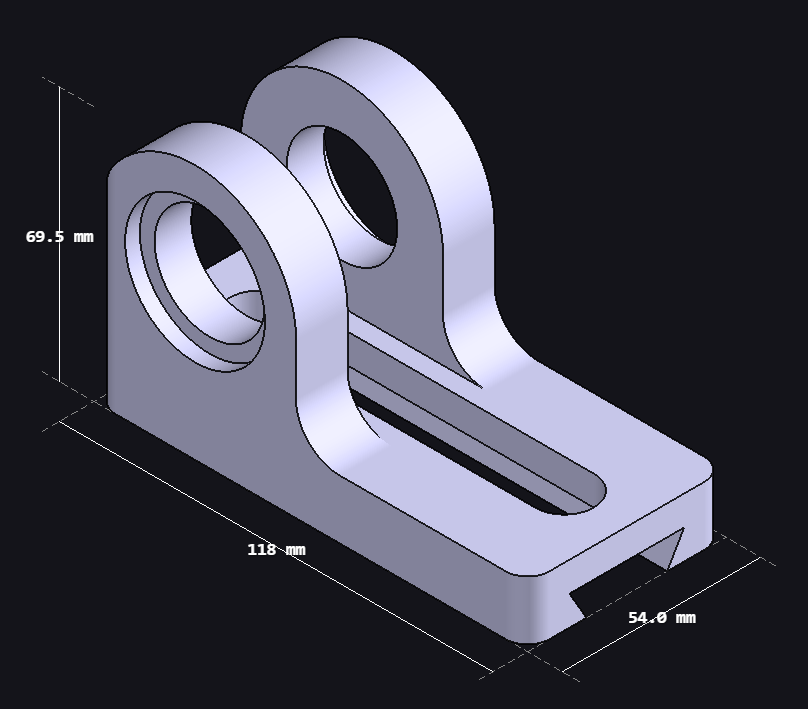
It looks correct, but we don’t have to rely on our eyes. On TooTallToby, users verify whether they’ve completed a model correctly by applying the given material (1060 aluminum, in this case) and checking the mass of the part.
Backflip doesn’t allow you to apply materials, so in order to check it I first needed to pull the model into CAD. Backflip has an Autodesk Fusion add-in that will import the part, with feature tree, directly into Fusion. When I tried it for this part, the add-in only partially recreated the geometry, as you can see in the screenshot below:
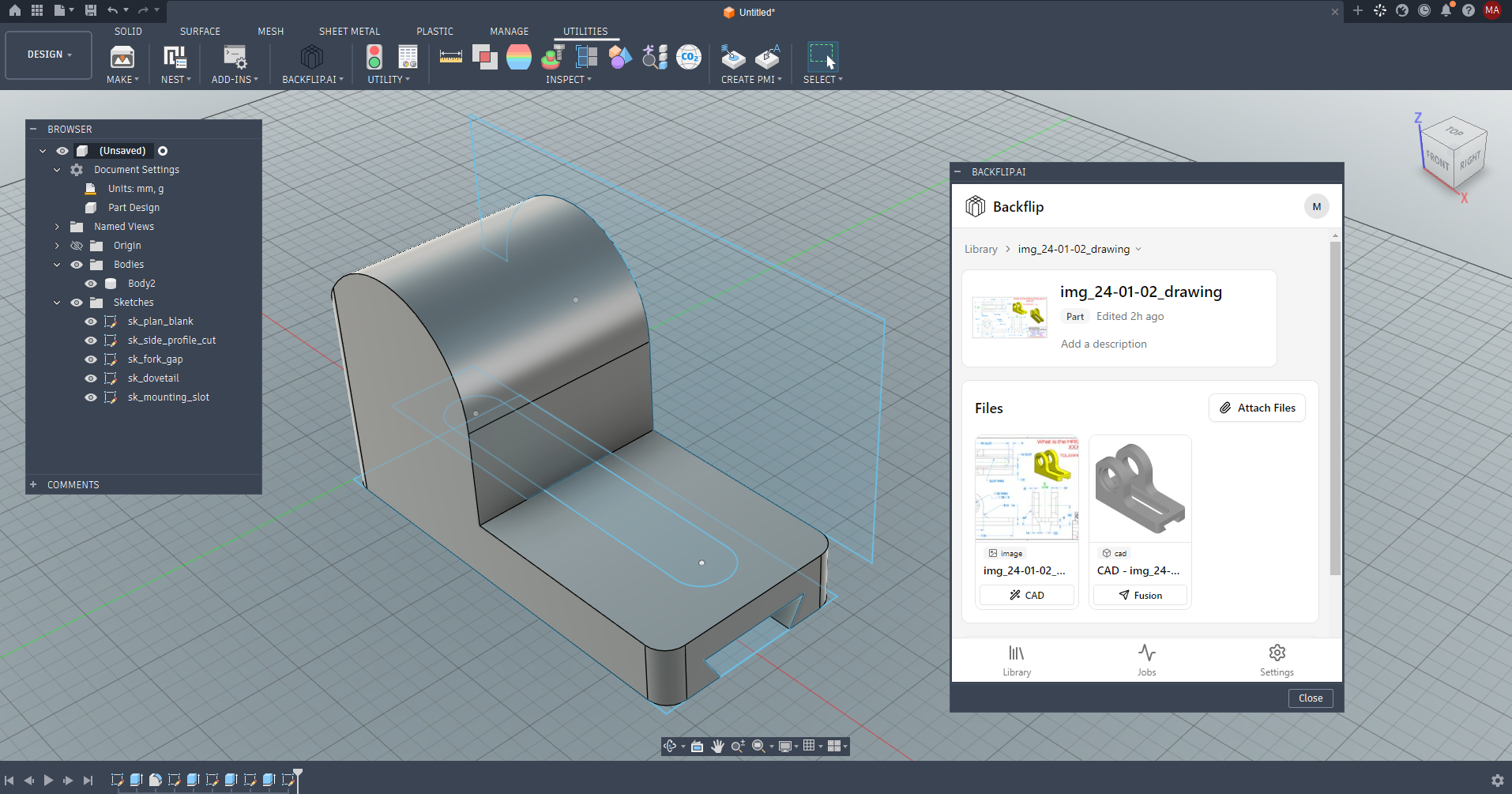
Since the add-in failed, I downloaded a STEP file of the part instead. STEP files don’t have feature trees, but for this test that didn’t matter. I was able to import it into Fusion, apply the material, and check the mass. I won’t give away the answer (you can check it yourself on TooTallToby.com) but I can verify that Backflip got it exactly correct.
As of this writing, 3,133 TooTallToby users have successfully modeled that drawing in CAD. The fastest of them can do it in under five minutes, but the average solve time is 16 minutes and 30 seconds.
Backflip AI did it in 7 minutes and 18 seconds.
I decided to test Backflip with a more difficult challenge from TooTallToby. You can see the drawing here, or take my word that Backflip’s CAD conversion looked exactly correct:
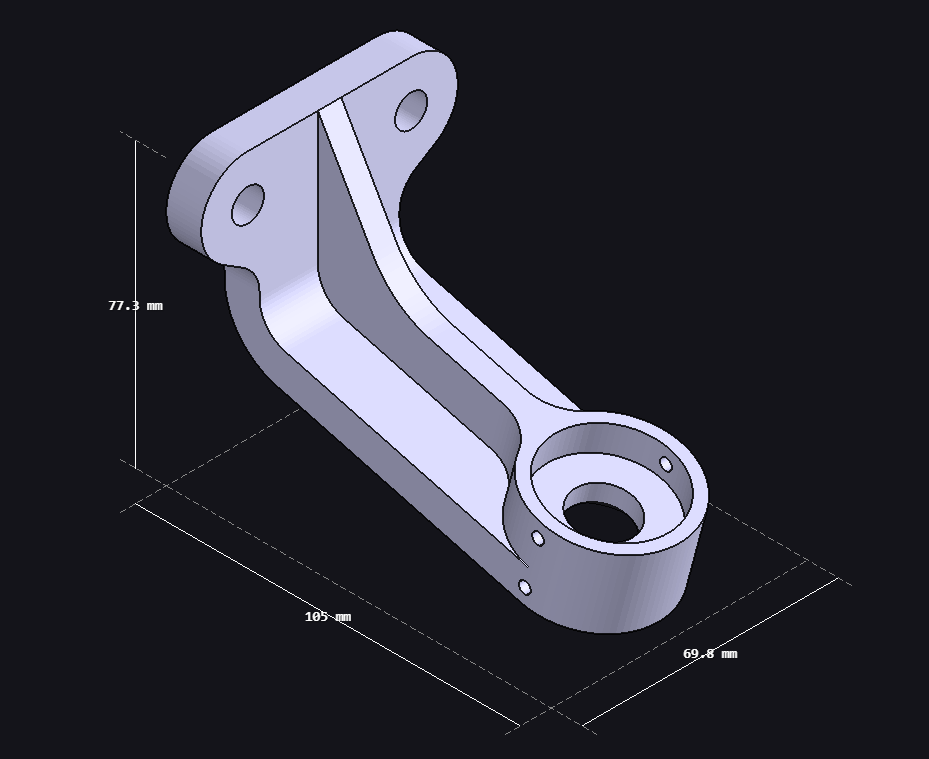
To verify its mass, I tried again to bring this model into Fusion with the Backflip add-in. It was better than my first attempt, but there were still discrepancies between the model on Backflip and the one in Fusion (note the tiny holes near the bottom of the bracket, which are absent in Fusion).
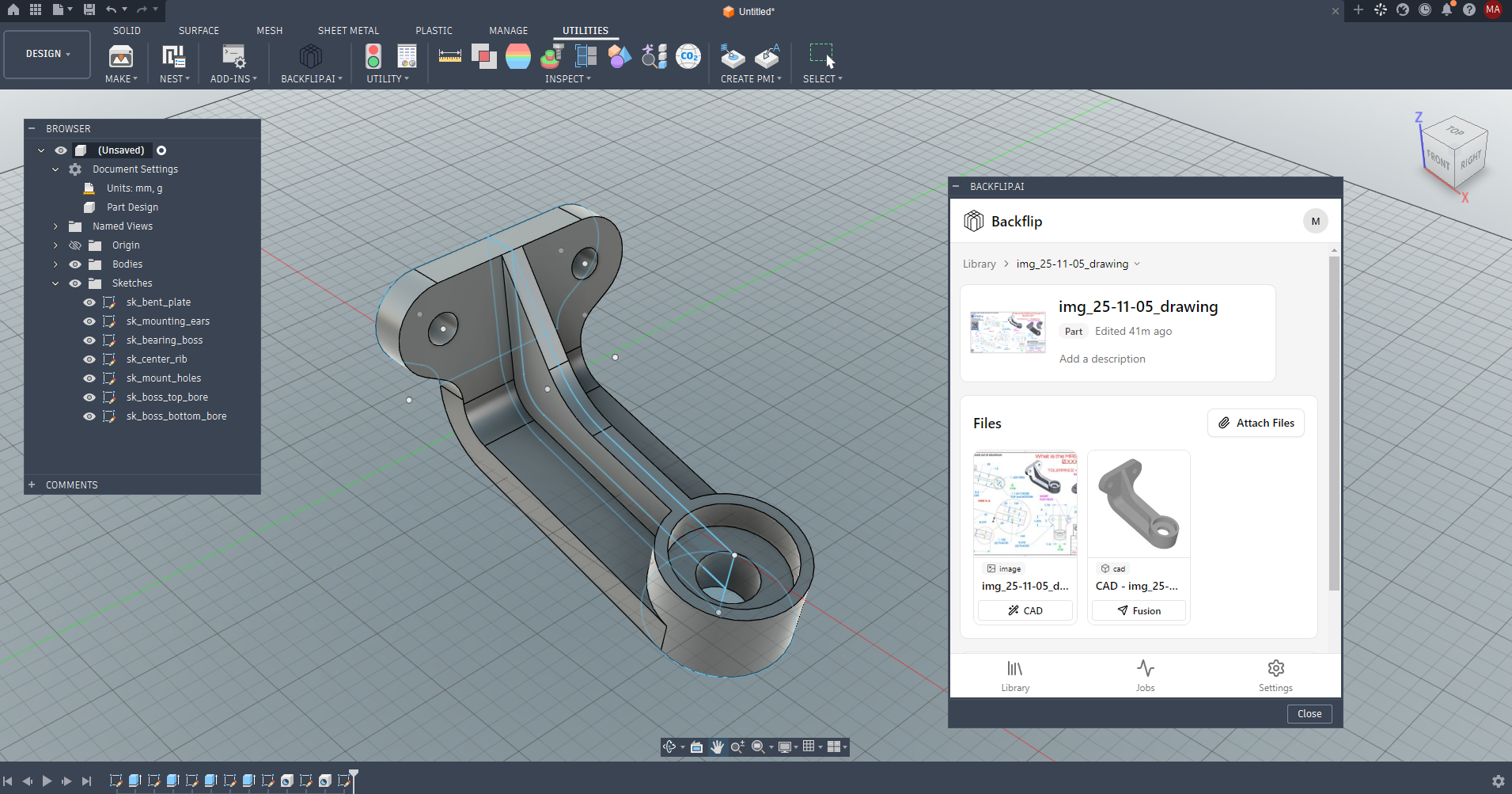
As before, I had to download the STEP file to apply the material and check the mass. And once again, Backflip aced the test. Its 10-and-a-half minute solve time was even more impressive compared to this drawing’s user average of nearly 34 minutes.
That was two in a row. I decided to try one last TooTallToby drawing, a multibody wire shelf. This time, Backflip failed, and obviously—it only created one of the seven bodies, though as far as I could tell, it was correct.
Despite the final failure, I’m impressed. Not only did two of the drawing-to-CAD models look accurate, they were verifiably exact. They may have been simplistic, made to be modeled and lacking the dust and difficulty of real shop drawings. But the fact that Backflip AI pulled off two perfect CAD models marks, to my mind, a milestone.
“People, all of us, haven’t internalized how crazy this is yet,” Mark told me.
Mark, a self-described “AI believer,” told me that he believes Backflip will allow 100 million more people to use CAD. “Vibe-CADding,” he says, “is about to explode open.”
Brace yourself. I’ll keep testing Backflip to see what it can and can’t do, and in the meantime, let me know your thoughts on vibe-CADding at [email protected].
Top Workplaces for Engineers 2027
Engineering.com and Energage have partnered again to determine the best engineering workplaces in the U.S. Nominations for the Top Workplaces for Engineers 2027 are open until November 6, 2026.

For more information and to see the past winners, visit the Top Workplaces for Engineers website.
To go directly to the nomination form, click here.
Arrowfly launches AI for Engineers
Engineering.com’s parent company Arrowfly has launched AI for Engineers, an initiative that combines news, research, live events, and an advisory board to help engineers apply AI in their discipline.

The first annual flagship event will be held September 20 – 22, 2027 at the M Resort Spa & Casino in Henderson, Nevada. You can register here.
Quick hits
- Chipmaker AMD has agreed to acquire World Labs, an AI research lab, for an all-stock transaction valued at approximately $8.2 billion. The deal is expected to close by the end of the year.
- Synopsys has announced AgentEngineer, a “portfolio of domain-specific long-horizon agents that can reason, plan, and execute complete engineering workflows from silicon to systems across verification, system validation, implementation, analog, manufacturing, and simulation and analysis domains.”
- MathWorks has announced the latest version of Matlab and Simulink, release 2026b, which includes the new Simulink Variant Manager, Visual Inspection Toolbox, and Polyspace Test Server plus expanded capabilities across existing tools.
- CoLab has announced generative artifacts, a new capability for its engineering AI platform. It doesn’t generate CAD, the company says, but rather “other artifacts that engineering teams must mature and approve for release… for example, a Design Failure Mode and Effects Analysis (DFMEA) or a root cause analysis.” CoLab says it plans to release a generative CAD product in the first half of 2027.
One last link
Check out the latest from Engineering.com senior editor Ian Wright: The speed paradox in 3D printing.
Got news, tips, comments, or complaints? Reach me at [email protected].