Here are the highlights from Autodesk’s annual user conference, taking place this week in Las Vegas.
This is Engineering Paper, and here’s the latest design and simulation software news.
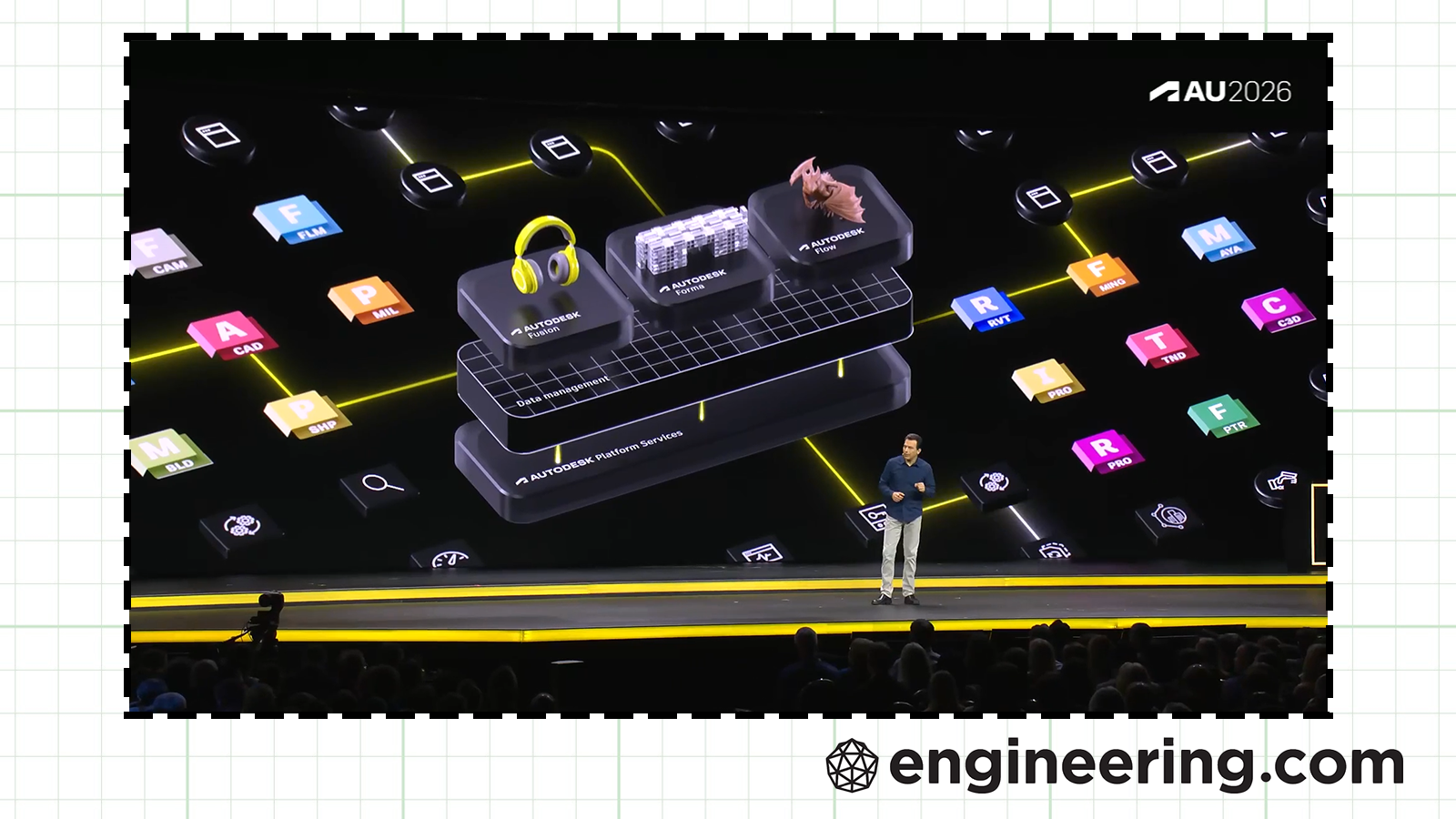
It’s September, and you know what that means: leaves are hitting the road, and so are users and employees of Autodesk, who have gathered this week for the company’s annual conference, Autodesk University.
AU 2026 has returned to Las Vegas, Nevada, and I’m going to break that city’s cardinal rule by telling you exactly what happened in Vegas.
The next generation Autodesk Assistant
Autodesk Assistant, the company’s AI interface, will continue evolving from a product support chatbot into a holistic agent. The Assistant is currently available within many Autodesk products, but the company has a broader vision for it.
“In the not-so-distant future, Autodesk Assistant will be available as a standalone agentic first experience, one that reaches across products,” Andrew Anagnost, Autodesk’s CEO, said in his opening keynote.
As such, the next gen Autodesk Assistant aims to not only give users a single entry point to a diverse set of Autodesk applications, but to connect them and their data together as well.
“Rather than requiring professionals to know which Autodesk product or AI capability to reach for, the next generation experience starts from what they are trying to accomplish, brings forward the relevant information and capabilities, and keeps professional in control,” reads Autodesk’s press release.
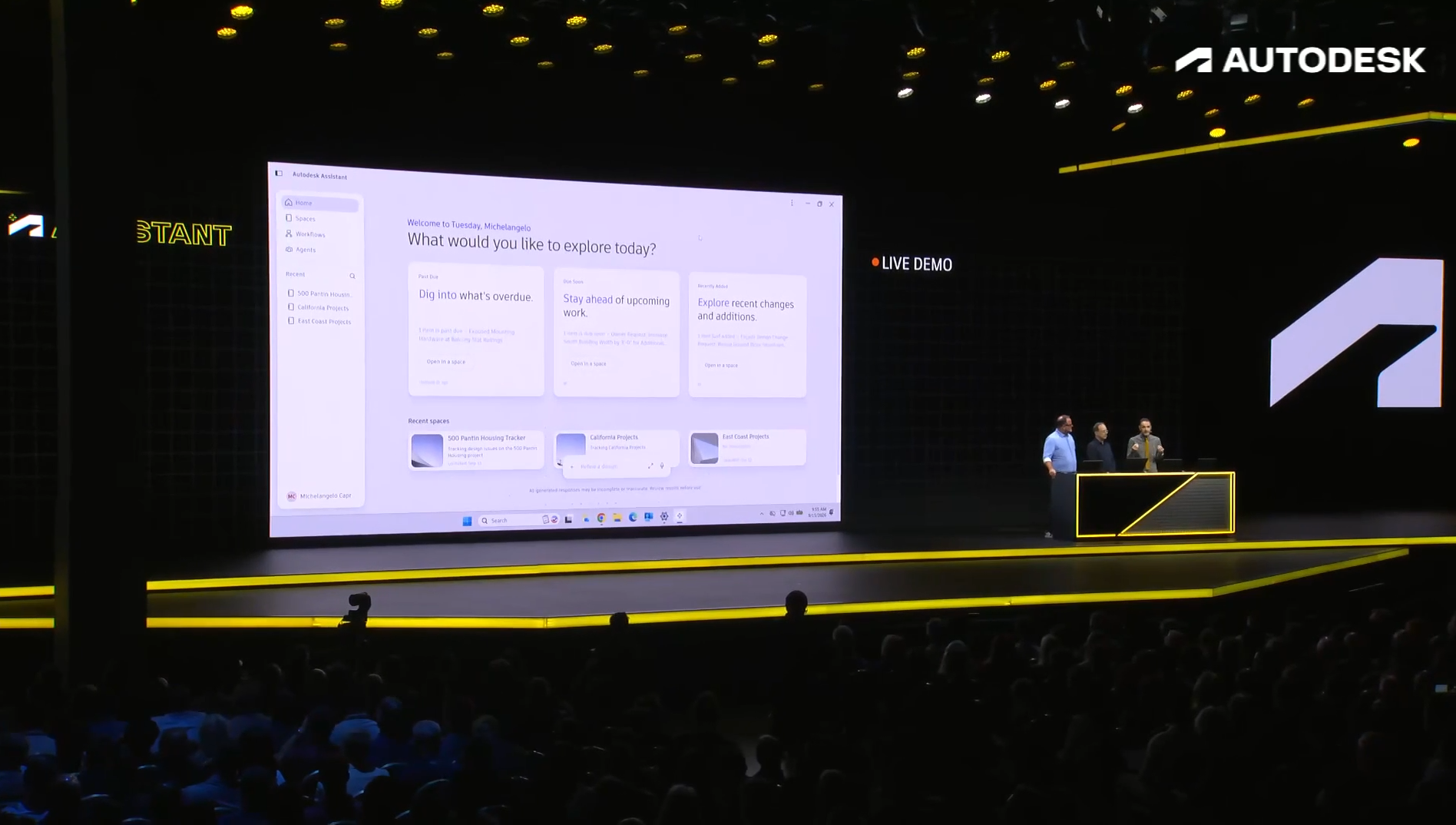
The standalone experience is not yet available, but Autodesk says it will announce details on timing, pricing, and terms in 2027. Anagnost emphasized that the standalone experience would not replace the in-product Autodesk Assistants or other tools and interfaces.
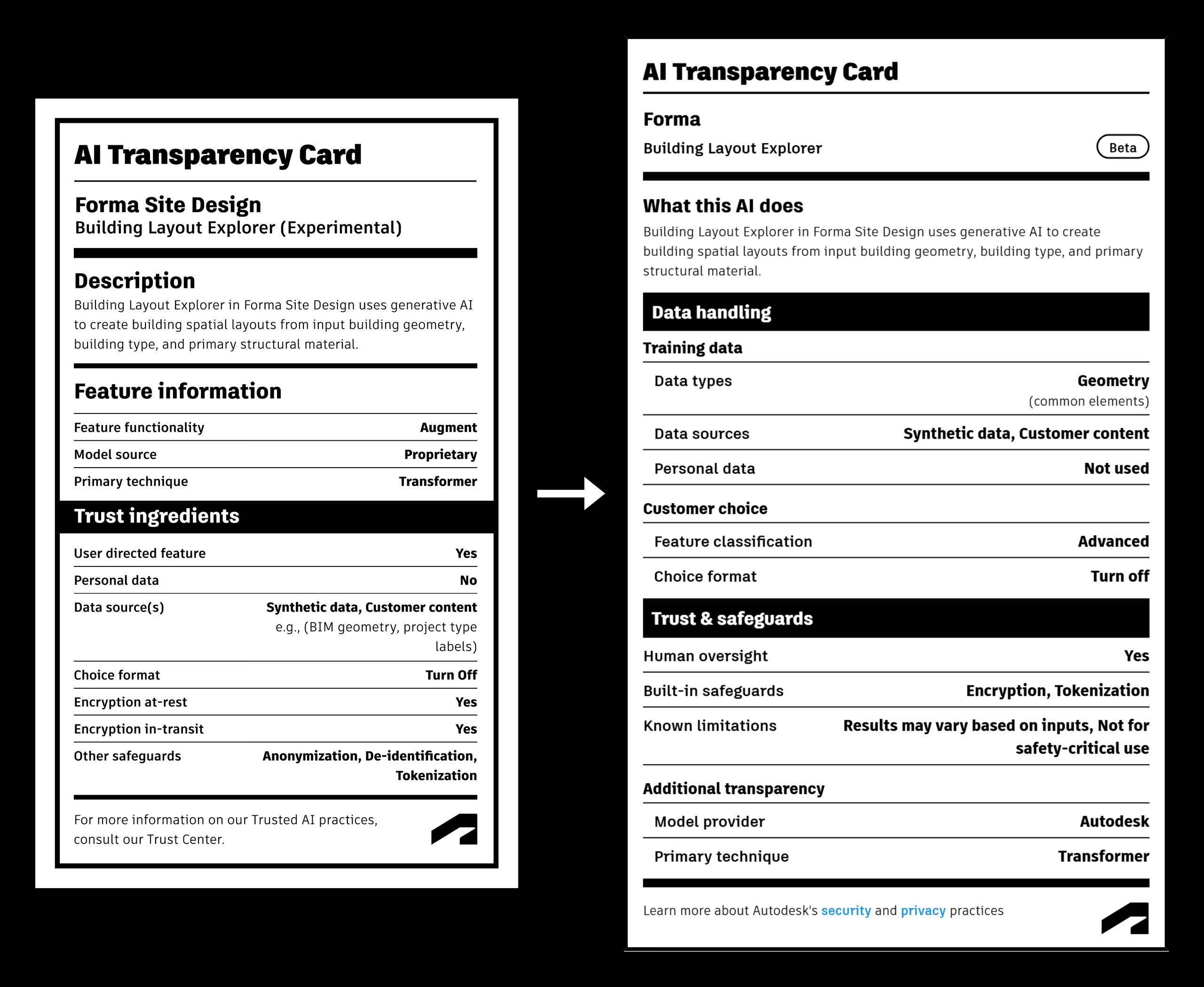
To encourage trust in the Assistant, Autodesk has also revamped its AI Transparency Cards, which mimic nutrition labels for AI. They reveal what specific AI models do, how they’re trained, who provides them, and their known limitations, among other details. If users ask the Autodesk Assistant about any of those topics, it will cite the card in its response.
The latest AI features for Fusion
At last year’s AU, the big theme was something Autodesk called neural CAD. Mike Haley, leader of the machine intelligence group at Autodesk Research, described it at the time as “a category of generative AI models trained to directly reason both about CAD objects and industrial and architectural systems.”
In 2025, neural CAD was more promise than product. In 2026, that’s still true. Haley said in a media briefing last week that neural CAD has “significantly evolved,” yet, as with last year, it’s “still an exploration. This is not in the product yet.”
There are, however, more things to explore. Haley spoke of three neural CAD features for Fusion, AutoTimeline, AutoAssemble, and Project Quill, that represent its evolution.
We’ve already learned about two of the three. AutoTimeline is a feature that turns an imported solid into a parametric part with a feature tree (timeline, in Fusion parlance). Autodesk isn’t breaking ground with this feature—see Backflip or CADfit for other examples—but if it’s implemented well, it’ll be a useful addition to Fusion. Project Quill is a design interface that combines sketching, prompting, and AI image generation so that users can “communicate an idea in a way that feels incredibly natural,” according to Haley.
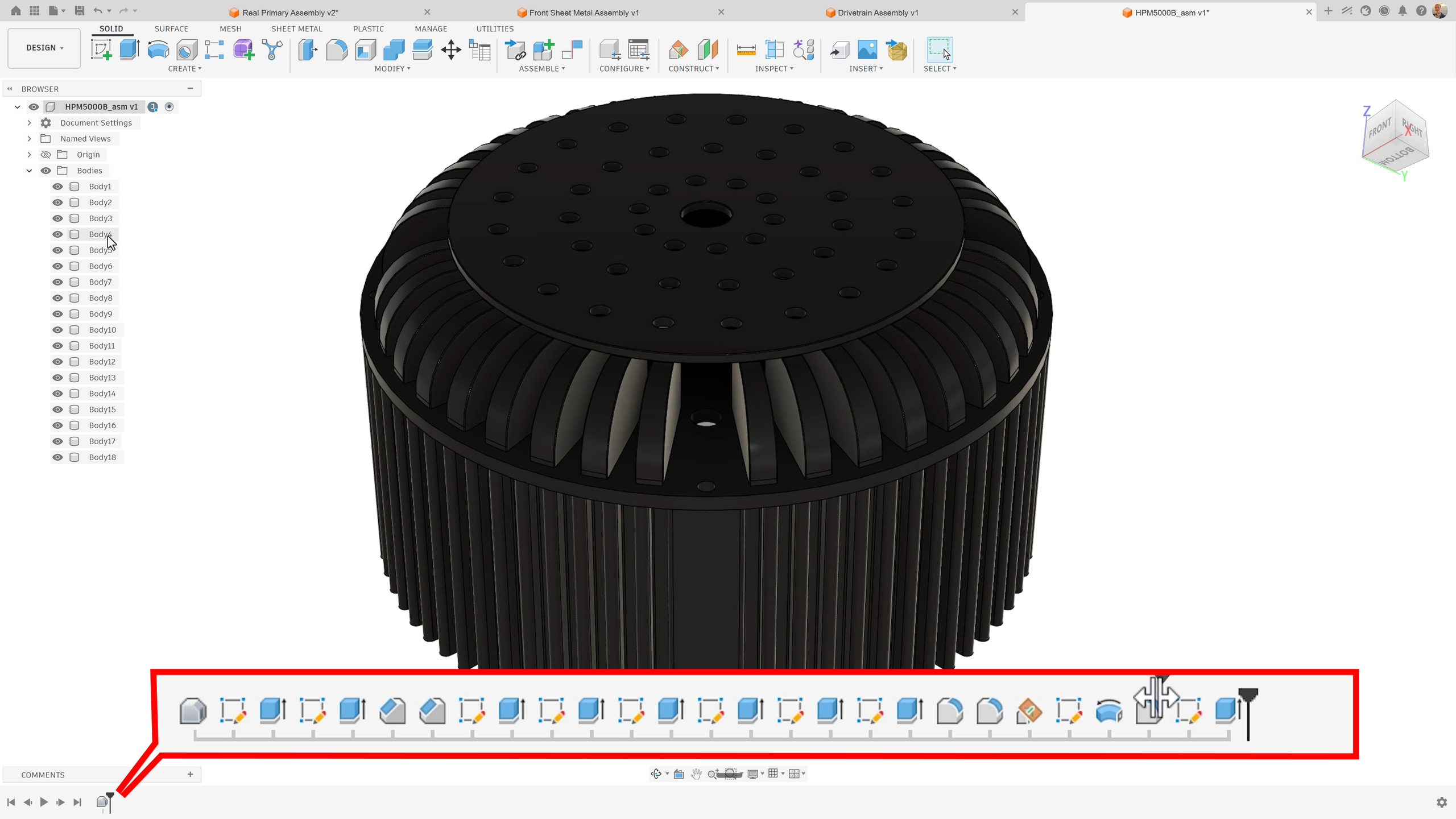

AutoAssemble was new to me, however. Anagnost described on stage how it and AutoTimeline could help engineering teams, using the example of a bumper for an autonomous lawnmower.
“Files of existing parts often don’t contain any information about how things were designed or constrained, but with AutoAssemble and AutoTimeline in Fusion, that’s not a problem. Fusion will find the connection points and properly orient and constrain the assembly. It even generates an editable, intelligent timeline of the features required to edit the bumper,” he said.
He also noted that an AI feature called “Find Similar” in Fusion could find alternative parts for the design, and that AI will soon come to Fusion’s CAM workspace to automatically generate toolpaths (that feature is called “System Modeler” in the relevant press release). Finally, Anagnost announced that Fusion will be getting “a brand new agentic PLM experience… that provides early insights and accelerates decision making.”
I’m still not clear on when these features will be available, but I’ll hunt down some answers this week. Stay tuned.
Autodesk for Small Business gets bigger
In May, Autodesk launched a program called Autodesk for Small Business that would provide special support for that demographic. It came with a dedicated website, special offers, and a more affordable package of Flex tokens.
There are a few new additions to the program. One is Support for Small Business, a “dedicated support experience [that] gives small teams a clear path to create a case and connect with an Autodesk specialist,” according to the announcement. That support can be found in users’ Account Admin Center.
Autodesk will also offer new Flex token packages for common workflows “so a small business can see whether a pack covers the job without first having to work out the token math,” per the announcement. I have yet to see any specific examples.
Finally, Autodesk has partnered with IT security firm CrowdStrike to give small business customers 50% off certain CrowdStrike products (this offer is only for U.S. customers, though Autodesk says it may expand internationally). Autodesk will also introduce passkeys for sign-in.
An AOS update
When Autodesk bought MaintainX for $3.6 billion back in June, it also launched a new business unit called Autodesk Operations Solutions, or AOS. Stephen Hooper, formerly VP of cloud-based product design and manufacturing solutions, was tapped to run it.
“Operations is where every design decision meets reality. Every maintenance event, equipment failure, repair, and performance improvement creates valuable operational knowledge,” Hooper wrote in a new blog post about AOS.
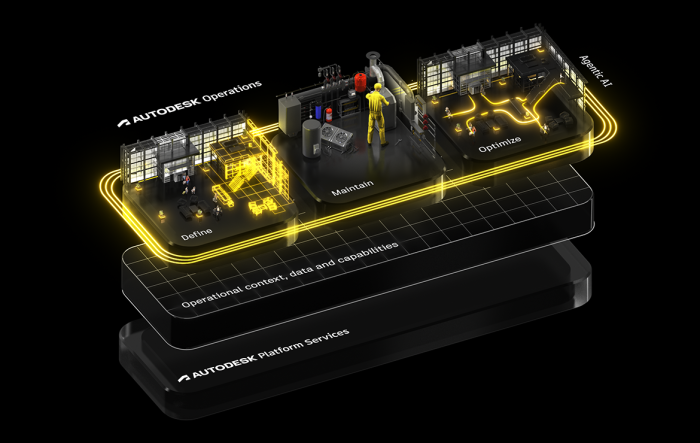
There are two main pillars of AOS. MaintainX, Hooper wrote, “brings maintenance execution and frontline workflows into our operations platform,” i.e., Autodesk Tandem, which “brings spaces, systems, assets, processes, and operational data into a shared digital twin of the physical environment.”
At AU, Autodesk showed off how a Tandem integration with its AEC industry cloud Forma could be used to create an operational digital twin. The company also announced a new integration between Tandem and FlexSim, Autodesk’s discrete event simulation software, that will allow users to run simulations directly in Tandem.
More on Forma
Adding on to Forma Site Design and Forma Building Design, Autodesk has announced Forma Street Design, a tool for civil engineers and planners to explore street configurations. It will roll out as a beta soon.
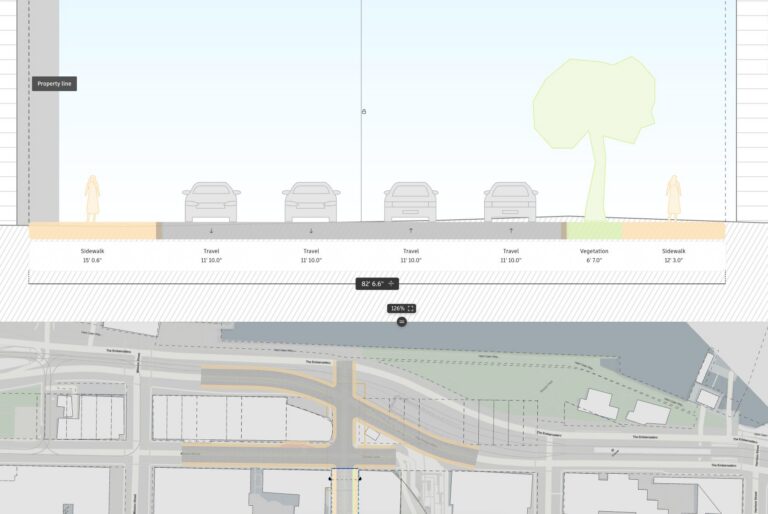
Street Design is part of a push to connect civil engineering more directly to Forma, according to AEC EVP Amy Bunszel. As such, Autodesk Civil 3D will become the latest Forma Connected Client, a designation that it shares with Revit and which means it integrates with the Forma industry cloud.
“Designers can bring Civil 3D data into Forma as a starting point for planning and building design, while civil engineers can continue using the detailed workflows they rely on, helping teams maintain project context more consistently and reducing the need to rebuild information as projects advance,” Bunszel wrote in a new blog post.
Check it out for a few more Forma details, but one worth noting is that Revit’s fate is officially sealed. In answer to the question “Will Autodesk Forma replace Revit?” Bunszel is blunt.
“Over time, yes,” she wrote. “More and more of the work that happens in Revit today will happen directly in Forma. That is intentional… We will not force a sudden transition, but the direction is clear: more AEC work will happen directly in Forma. We will continue investing in Revit to give customers a practical path toward that future.”
I’ll bring you more news on AU 2026 as this week, like the newest iPhone, unfolds.
An InfinitForm follow-up
Last week I reported on InfinitForm, a cloud-based generative design platform. Or at least, that’s how I described it in InfinitForm brings determinism back to generative design.
Founder and CEO Michael Bogomolny pushed back on my characterization.
“It’s way beyond generative design,” he emailed me. “As you can imagine, we are evolving, product is [evolving] and our positioning accordingly. We are getting into a decision making platform, not a generative tool.”
If you’re an InfinitForm user, let me know how you’d describe the platform at [email protected].
One last link
How about some news from a different industry event happening this week, IMTS 2026: Universal Robots unveils Gen 7 platform for AI-ready automation by Engineering.com senior editor Mike Ouellette.
Got news, tips, comments, or complaints? Reach me at [email protected].